> For the complete documentation index, see [llms.txt](https://sharinghub.kittenbot.hk/llms.txt). Markdown versions of documentation pages are available by appending `.md` to page URLs; this page is available as [Markdown](https://sharinghub.kittenbot.hk/airelated/koi2/koi2makecode/pictureshow.md).

# 拍照及顯示照片

### MakeCode編程教學

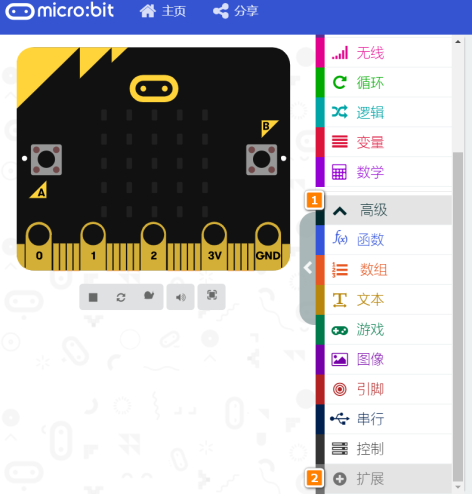
在MakeCode打開專案，點擊擴展一頁。

<figure><img src="https://kittenbothk.readthedocs.io/en/latest/_images/16-1.png" alt=""><figcaption></figcaption></figure>

在搜尋欄輸入koi 2。

<figure><img src="/files/v8PGKqCshXiZsiXziuOs" alt=""><figcaption></figcaption></figure>

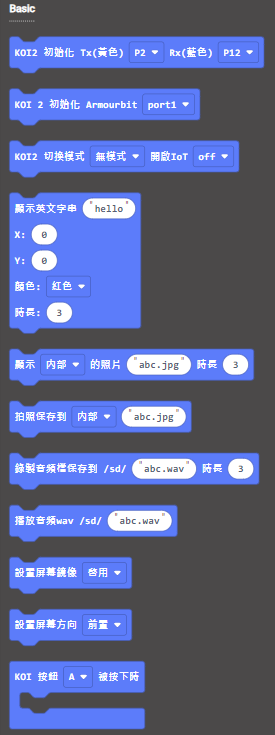
加載成功後，積木欄會新增koi2的積木。

<figure><img src="/files/nGf4RzfogJMXUu8gAZwE" alt=""><figcaption></figcaption></figure>

### 編程積木

<figure><img src="https://files.gitbook.com/v0/b/gitbook-x-prod.appspot.com/o/spaces%2F6uJvpXC43onNIIwhMlWo%2Fuploads%2FQAKH0swJ9etd62AIfV4u%2Fimage.png?alt=media&#x26;token=71c6751c-de4c-42d1-8f44-63328568e674" alt=""><figcaption></figcaption></figure>

### 參考程式

{% hint style="info" %}
Armourbit用家請使用初始化Armourbit積木。
{% endhint %}

<figure><img src="https://files.gitbook.com/v0/b/gitbook-x-prod.appspot.com/o/spaces%2F6uJvpXC43onNIIwhMlWo%2Fuploads%2FPGyECwlPd2M3JqUBLDfO%2Fimage.png?alt=media&#x26;token=662ace3f-a8eb-4fbf-8a10-1d9643c88b1e" alt=""><figcaption></figcaption></figure>

{% embed url="<https://makecode.microbit.org/_Dzi86CLsa6je>" %}

[參考程式](https://makecode.microbit.org/_Dzi86CLsa6je)

#### 程式解說

1. 按下A鍵，拍照並儲存為abc.jpg。
2. 按下B鍵，顯示abc.jpg。