# 預載模型 三色球追蹤

### <mark style="color:green;">MakeCode編程</mark>

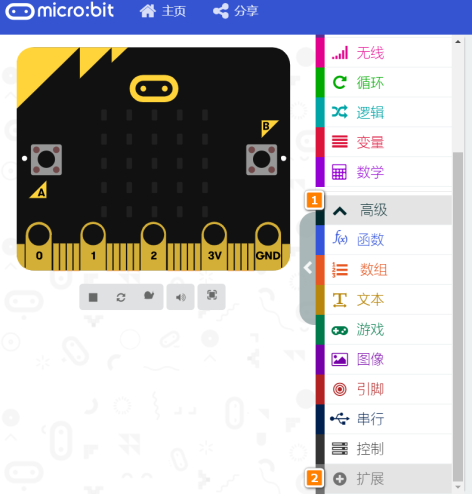
在MakeCode打開專案，點擊擴展一頁。

<figure><img src="https://kittenbothk.readthedocs.io/en/latest/_images/16-1.png" alt=""><figcaption></figcaption></figure>

在搜尋欄輸入koi 2。

<figure><img src="/files/v8PGKqCshXiZsiXziuOs" alt=""><figcaption></figcaption></figure>

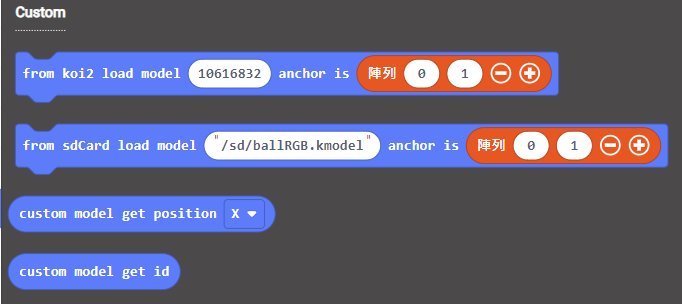
加載成功後，積木欄會新增koi2的積木。

<figure><img src="/files/nGf4RzfogJMXUu8gAZwE" alt=""><figcaption></figcaption></figure>

### 編程積木

<figure><img src="https://files.gitbook.com/v0/b/gitbook-x-prod.appspot.com/o/spaces%2FsN6MlwBFbL3P67FzMMyL%2Fuploads%2FgpuhipsLjjrrtJQh6Gwf%2Fimage.png?alt=media&#x26;token=f2b4f596-e1e7-4266-a2cd-a5fff7668312" alt=""><figcaption></figcaption></figure>

### 參考程式

{% hint style="info" %}
Armourbit用家請使用初始化Armourbit積木。
{% endhint %}

<figure><img src="https://files.gitbook.com/v0/b/gitbook-x-prod.appspot.com/o/spaces%2F6uJvpXC43onNIIwhMlWo%2Fuploads%2FPGyECwlPd2M3JqUBLDfO%2Fimage.png?alt=media&#x26;token=662ace3f-a8eb-4fbf-8a10-1d9643c88b1e" alt=""><figcaption></figcaption></figure>

{% embed url="<https://makecode.microbit.org/_5bRLAUPwXFr3>" %}

[參考程式](https://makecode.microbit.org/_5bRLAUPwXFr3)

#### 程式解說

1. KOI會自動追蹤三色球，Micro:bit會顯示現時追蹤到的球ID。
2. 按B可以顯示球的座標。


---

# Agent Instructions: Querying This Documentation

If you need additional information that is not directly available in this page, you can query the documentation dynamically by asking a question.

Perform an HTTP GET request on the current page URL with the `ask` query parameter:

```
GET https://sharinghub.kittenbot.hk/airelated/koi2/koi2makecode/rgbball.md?ask=<question>
```

The question should be specific, self-contained, and written in natural language.
The response will contain a direct answer to the question and relevant excerpts and sources from the documentation.

Use this mechanism when the answer is not explicitly present in the current page, you need clarification or additional context, or you want to retrieve related documentation sections.