# Newbit x Jacdac 玩法介紹

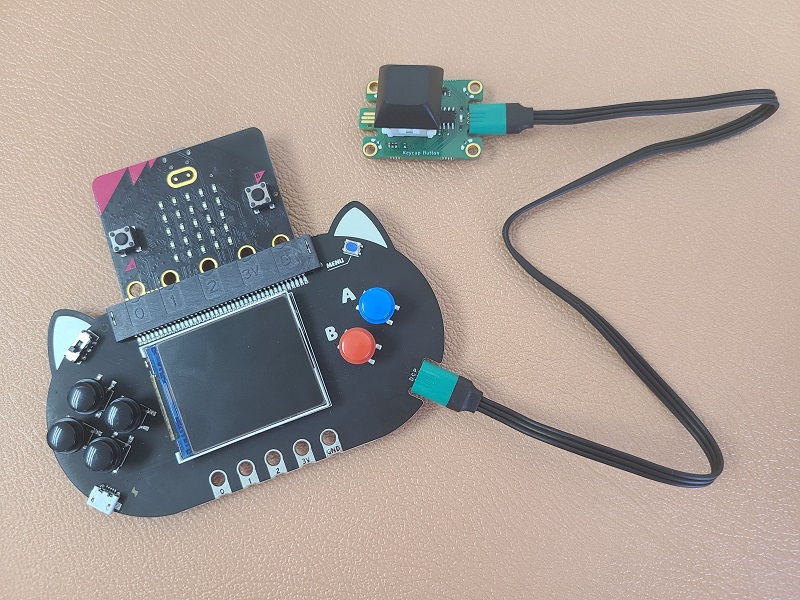
Newbit帶有Jacdac接口，可以連接各種Jacdac模組令編程靈活性更大。

### Newbit的Jacdac接口可以連接各種Jacdac模組

有關Jacdac的介紹請參考以下文章：

{% content-ref url="/pages/3uTgUz5OnFtTB5dxOEIB" %}
[Jacdac介紹](/jacdac/jacdac.md)
{% endcontent-ref %}

### Jacdac 模組使用教學

首先，將Jacdac模組使用連接線連接到Newbit。(此處以按鍵模組為例)

<figure><img src="https://kittenbothk.readthedocs.io/en/latest/_images/jacdac.jpg" alt="" width="375"><figcaption></figcaption></figure>

插入Jacdac模組後，MicroCode會自動加入相應的積木。

由於按鍵模組是屬於輸入的按下類別，按鍵模組相應的節目可以在按下類中找到。

<figure><img src="/files/aTr0lvcW6LkgCaV2NT9V" alt=""><figcaption></figcaption></figure>

假如插入的Jacdac模組為輸出類(例: RGB燈圈)，相應的積木就會在輸出欄裡面找到。

<figure><img src="/files/N0LwTyIOplyNa7YfCDWh" alt=""><figcaption></figcaption></figure>


---

# Agent Instructions: Querying This Documentation

If you need additional information that is not directly available in this page, you can query the documentation dynamically by asking a question.

Perform an HTTP GET request on the current page URL with the `ask` query parameter:

```
GET https://sharinghub.kittenbot.hk/expansion_board/newbit-arcade-shield/newbitmicrocode/newbitxjacdac.md?ask=<question>
```

The question should be specific, self-contained, and written in natural language.
The response will contain a direct answer to the question and relevant excerpts and sources from the documentation.

Use this mechanism when the answer is not explicitly present in the current page, you need clarification or additional context, or you want to retrieve related documentation sections.