> For the complete documentation index, see [llms.txt](https://sharinghub.kittenbot.hk/llms.txt). Markdown versions of documentation pages are available by appending `.md` to page URLs; this page is available as [Markdown](https://sharinghub.kittenbot.hk/functional_modules/pwmodules/armourbit.md).
# Armourbit擴展盒
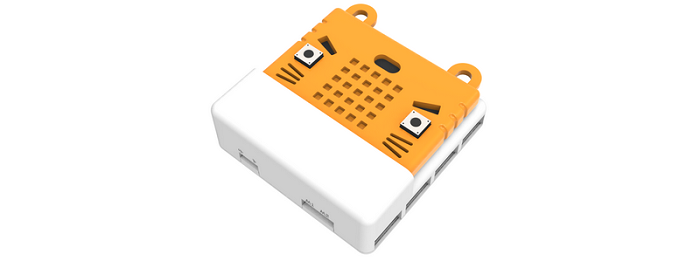 跟Robotbit 性質類似, Armourbit 也是 Microbit的一款擴展配件,由於它外形像個盒子, 就稱它為Microbit 擴展盒。
Armourbit 是Powerbrick (能量魔塊) 套件體系的主控盒,打通Microbit與套件中各種Brick (魔塊)的連接。它具有以下特色:
1. 7個Port 位,1個I2C介面
2. 採用4PIN防反接端子口
3. 自帶蜂鳴器,兩路電機驅動
4. 八路舵機驅動
5. 對電路板進行全包裹,全方位保護更安全,適合編程教育的使用場景。
Armour中文意思是指盔甲,Kittenbot 開發人員希望這個擴展盒能給予Microbit擴展之餘, 還有全方位的保護,更適合課堂的使用環境。
### 詳細介紹[¶](broken://pages/9jR5r1cTvh4mKX4xWrjT)
跟Robotbit 性質類似, Armourbit 也是 Microbit的一款擴展配件,由於它外形像個盒子, 就稱它為Microbit 擴展盒。
Armourbit 是Powerbrick (能量魔塊) 套件體系的主控盒,打通Microbit與套件中各種Brick (魔塊)的連接。它具有以下特色:
1. 7個Port 位,1個I2C介面
2. 採用4PIN防反接端子口
3. 自帶蜂鳴器,兩路電機驅動
4. 八路舵機驅動
5. 對電路板進行全包裹,全方位保護更安全,適合編程教育的使用場景。
Armour中文意思是指盔甲,Kittenbot 開發人員希望這個擴展盒能給予Microbit擴展之餘, 還有全方位的保護,更適合課堂的使用環境。
### 詳細介紹[¶](broken://pages/9jR5r1cTvh4mKX4xWrjT)
 ### 規格[¶](broken://pages/9jR5r1cTvh4mKX4xWrjT)
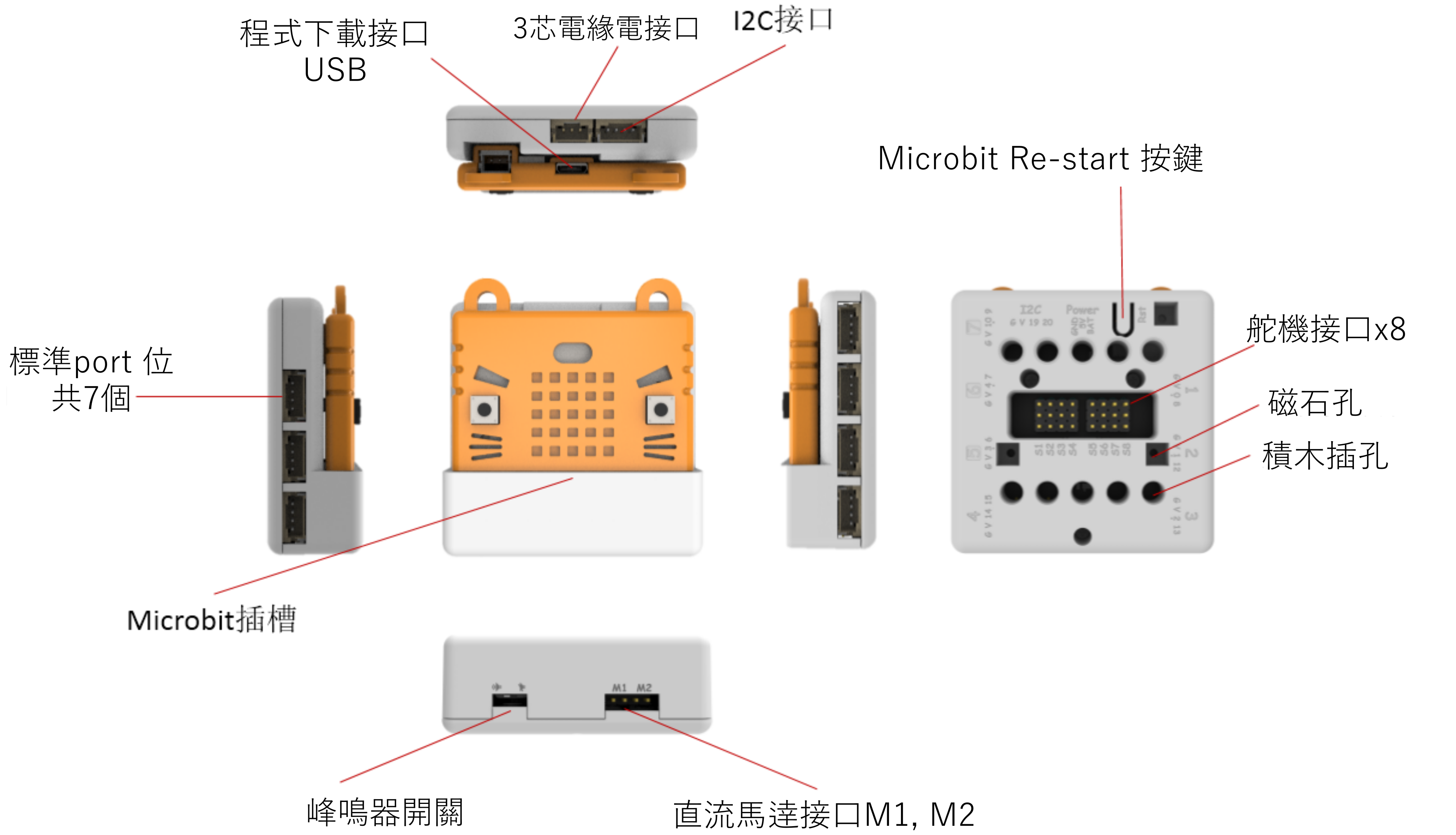
* 電壓:3.3V(板載不帶5V電壓)
* 尺寸:61mm X 61mm X 23mm
* 介面:PH2.0 4PIN端子 ,引腳服從GVAB排布
* 直流電機介面:電壓不超過5V,電流小於1A,適用於喵家黃色TT電機或者Geekservo電機
* 舵機介面:電壓3.7\~6V,單路電流小於100MA,總電流小於1A,適用9g藍色小舵機或喵家Geekservo
對應Makecode程式設計介面:
Makecode Online:
**Powerbrick 插件 (Extension)**:
### 引腳分布[¶](broken://pages/9jR5r1cTvh4mKX4xWrjT)
### 規格[¶](broken://pages/9jR5r1cTvh4mKX4xWrjT)
* 電壓:3.3V(板載不帶5V電壓)
* 尺寸:61mm X 61mm X 23mm
* 介面:PH2.0 4PIN端子 ,引腳服從GVAB排布
* 直流電機介面:電壓不超過5V,電流小於1A,適用於喵家黃色TT電機或者Geekservo電機
* 舵機介面:電壓3.7\~6V,單路電流小於100MA,總電流小於1A,適用9g藍色小舵機或喵家Geekservo
對應Makecode程式設計介面:
Makecode Online:
**Powerbrick 插件 (Extension)**:
### 引腳分布[¶](broken://pages/9jR5r1cTvh4mKX4xWrjT)
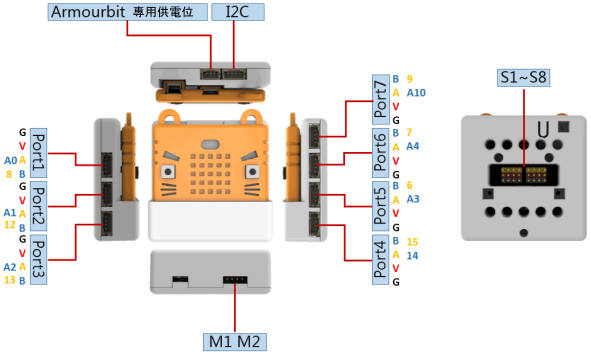 * 新手用戶無需記住Port位對應的引腳,只需記住port位使用即可。
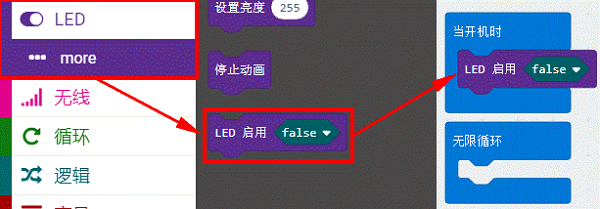
* 使用**Port5-Port7**口需關閉LED點陣屏功能(如下圖,關閉LED點陣操作)才能進行使用
* Port4口沒有模擬讀取功能(溫濕度的土壤水位魔塊不能使用)(因為Port5-Port7引腳被Microbit點陣屏佔用了)
* 新手用戶無需記住Port位對應的引腳,只需記住port位使用即可。
* 使用**Port5-Port7**口需關閉LED點陣屏功能(如下圖,關閉LED點陣操作)才能進行使用
* Port4口沒有模擬讀取功能(溫濕度的土壤水位魔塊不能使用)(因為Port5-Port7引腳被Microbit點陣屏佔用了)
 ### 使用注意事項[¶](broken://pages/9jR5r1cTvh4mKX4xWrjT)
* 舵機介面只能使用藍色的9g小舵機或Geekservo舵機,禁止插接大電流舵機。
* 直流電機(DC motor)介面只適用於喵家TT電機或Geekservo電機,禁止插接大電流電機。
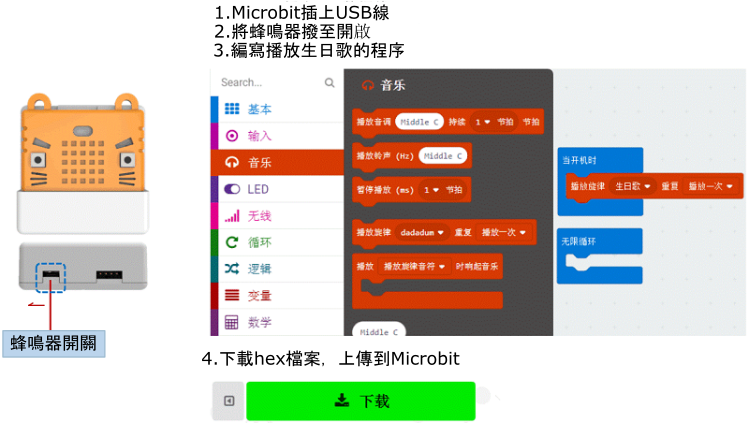
* 蜂鳴器與Microbit的P0複用,使用時需檢查底部的撥動開關是否打開。(蜂鳴器預設為開啟)
* 使用各個模組、電機、舵機,**必須接Powerbrick電池盒,否則因為電流不足,導致模組使用不正常。**
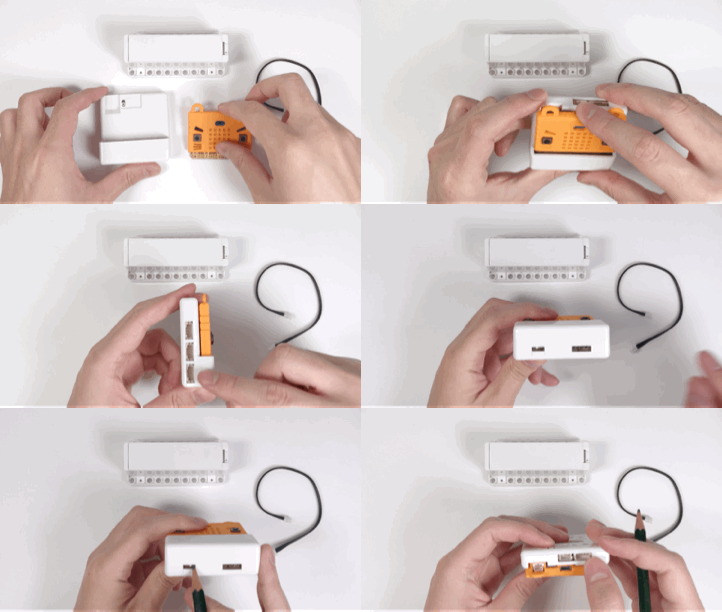
### Micro:bit安裝到Armourbit上示範[¶](broken://pages/9jR5r1cTvh4mKX4xWrjT)
下方左側的撥動開關是用來切換P0是否連接蜂鳴器
### 使用注意事項[¶](broken://pages/9jR5r1cTvh4mKX4xWrjT)
* 舵機介面只能使用藍色的9g小舵機或Geekservo舵機,禁止插接大電流舵機。
* 直流電機(DC motor)介面只適用於喵家TT電機或Geekservo電機,禁止插接大電流電機。
* 蜂鳴器與Microbit的P0複用,使用時需檢查底部的撥動開關是否打開。(蜂鳴器預設為開啟)
* 使用各個模組、電機、舵機,**必須接Powerbrick電池盒,否則因為電流不足,導致模組使用不正常。**
### Micro:bit安裝到Armourbit上示範[¶](broken://pages/9jR5r1cTvh4mKX4xWrjT)
下方左側的撥動開關是用來切換P0是否連接蜂鳴器
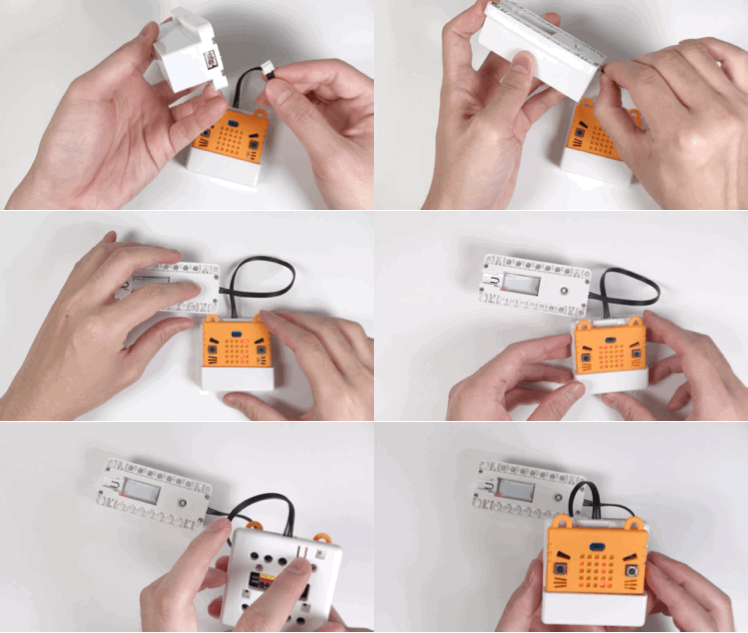
 ### Reset (重置)Microbit 示範[¶](broken://pages/9jR5r1cTvh4mKX4xWrjT)
用於重定Microbit的程式(這樣你就不用把Microbit 拿出來才能進行復位了)
### Reset (重置)Microbit 示範[¶](broken://pages/9jR5r1cTvh4mKX4xWrjT)
用於重定Microbit的程式(這樣你就不用把Microbit 拿出來才能進行復位了)
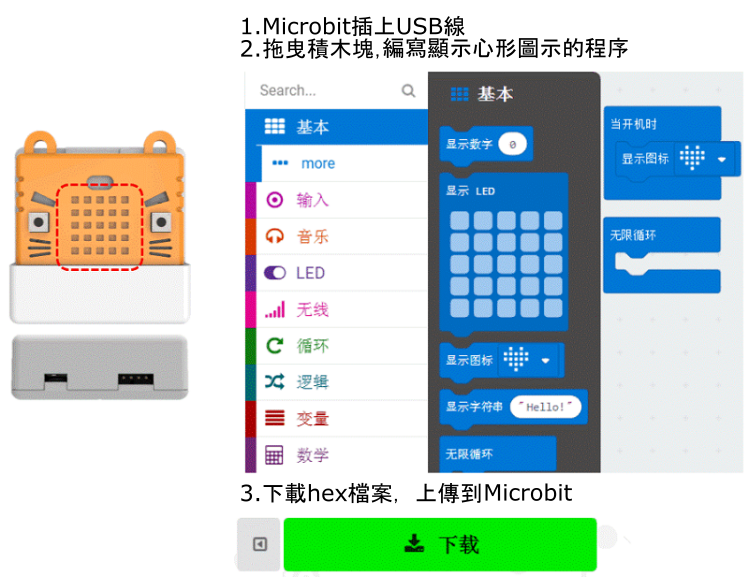
 ### MakeCode編程教學[¶](broken://pages/9jR5r1cTvh4mKX4xWrjT)
 #### 點陣屏編程[¶](broken://pages/9jR5r1cTvh4mKX4xWrjT)
與Microbit操作一樣
#### 點陣屏編程[¶](broken://pages/9jR5r1cTvh4mKX4xWrjT)
與Microbit操作一樣
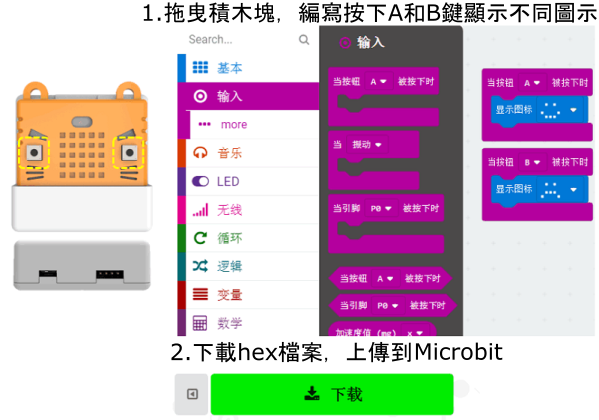
 #### 按鍵編程[¶](broken://pages/9jR5r1cTvh4mKX4xWrjT)
與Microbit操作一樣
#### 按鍵編程[¶](broken://pages/9jR5r1cTvh4mKX4xWrjT)
與Microbit操作一樣
 #### **蜂鳴器編程**[¶](broken://pages/9jR5r1cTvh4mKX4xWrjT)
與Microbit操作一樣
#### **蜂鳴器編程**[¶](broken://pages/9jR5r1cTvh4mKX4xWrjT)
與Microbit操作一樣
 ### 插件版本與更新[¶](broken://pages/9jR5r1cTvh4mKX4xWrjT)
插件可能會不定時推出更新,改進功能。亦有時候我們可能需要轉用舊版插件才可使用某些功能。
詳情請參考: [Makecode插件版本更換](https://kittenbothk.readthedocs.io/en/latest/Makecode/makecode_extensionUpdate.html)
### 插件版本與更新[¶](broken://pages/9jR5r1cTvh4mKX4xWrjT)
插件可能會不定時推出更新,改進功能。亦有時候我們可能需要轉用舊版插件才可使用某些功能。
詳情請參考: [Makecode插件版本更換](https://kittenbothk.readthedocs.io/en/latest/Makecode/makecode_extensionUpdate.html)