# 污水混濁度感應器

<figure><img src="/files/ZD1fyeIDSxSlYMUtYR0O" alt=""><figcaption></figcaption></figure>

### 污水混濁度感應器

污水混濁度感應器可以感測水的混濁程度。

### 產品參數

* 工作電壓：3V\~5V
* 接口：3pin防反插接口
* 類型: Analog 模擬模組
* 工作溫度：5°C\~85°C
* 重量：30g

### 接線教學

### Robotbit EDU

將感應器的A引腳接到Robotbit Edu的接口，將G和V接到電源。

{% hint style="info" %}
污水混濁度感應器需要類比訊號，如使用Micro:bit，請接到P0/P1/P2；如使用未來板，請接到P0/P1/P2/P12/P14/P15。&#x20;

污水混濁度感應器建議配合水溫感應器一同使用，以下圖表忽略去水溫感應器的接線，請自行參考有關教學。
{% endhint %}

<div><figure><img src="/files/93XewDMEAitvGp9mGarD" alt=""><figcaption></figcaption></figure> <figure><img src="/files/i29hsrP579BNMKRH1nI9" alt=""><figcaption></figcaption></figure></div>

### Robotbit 2.2

將感應器的A引腳接到Robotbit 2.2的接口，將G和V接到電源。

{% hint style="info" %}
污水混濁度感應器需要類比訊號，如使用Micro:bit，請接到P0/P1/P2；如使用未來板，請接到P0/P1/P2/P12/P14/P15。&#x20;

污水混濁度感應器建議配合水溫感應器一同使用，以下圖表忽略去水溫感應器的接線，請自行參考有關教學。
{% endhint %}

<figure><img src="/files/cnQIP1HpBzBpE339tPpE" alt=""><figcaption></figcaption></figure>

### MakeCode 編程教學

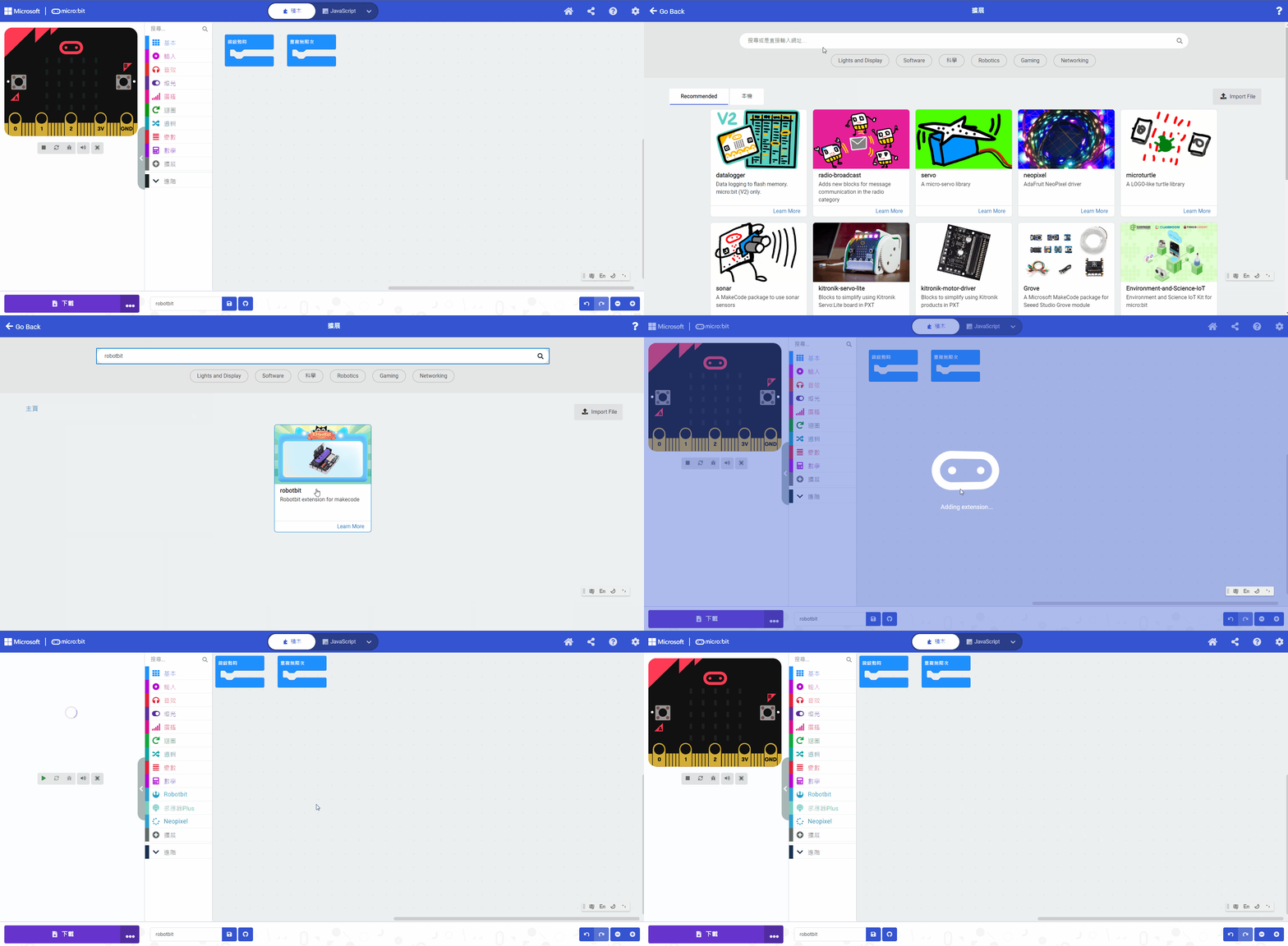
#### 在擴展頁直接搜尋Robotbit (Robotbit已經過微軟認證，可以直接搜尋)

<figure><img src="https://kittenbothk.readthedocs.io/en/latest/_images/robotbit_search.gif" alt=""><figcaption></figcaption></figure>

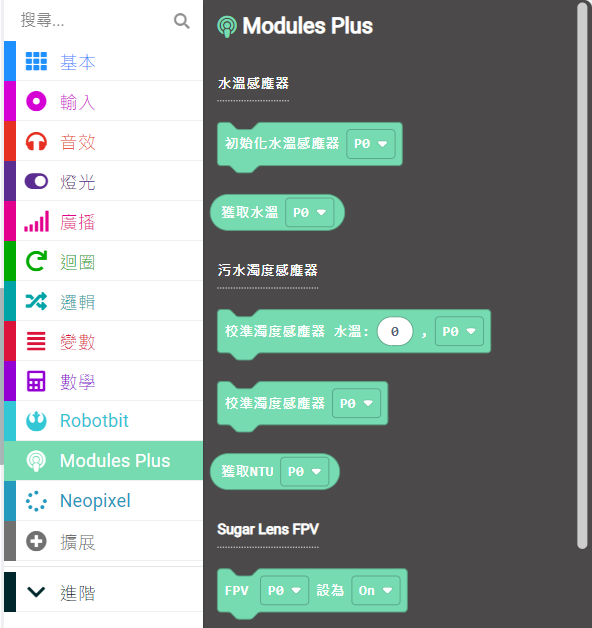
#### 感應器Plus插件：<https://github.com/kittenbothk/pxt-ModulePlus>

#### 詳細方法

#### 污水混濁度感應器積木塊：

<figure><img src="https://kittenbothk.readthedocs.io/en/latest/_images/turbidity2.png" alt=""><figcaption></figcaption></figure>

#### 污水混濁度感應器編程

```
污水混濁度感應器可以配合水溫感應器作校正使讀數更加準確。
注意：濁度感應器的頂部沒有防水，請不要將感應器完全浸入水中。
```

{% embed url="<https://makecode.microbit.org/_RwJDheeo578f>" %}

[參考程式網址](https://makecode.microbit.org/_RwJDheeo578f)

#### 插件版本與更新

插件可能會不定時推出更新，改進功能。亦有時候我們可能需要轉用舊版插件才可使用某些功能。

詳情請參考: [Makecode插件版本更換](https://kittenbothk.readthedocs.io/en/latest/Makecode/makecode_extensionUpdate.html)

### 未來板KittenBlock編程教學

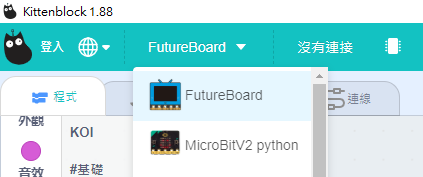
#### 在硬件欄選擇『未來板』

<figure><img src="https://kittenbothk.readthedocs.io/en/latest/_images/turbidity_kb1.png" alt=""><figcaption></figcaption></figure>

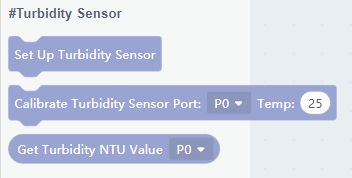
#### 污水混濁度感應器積木塊：

<figure><img src="https://kittenbothk.readthedocs.io/en/latest/_images/turbidity_kb2.png" alt=""><figcaption></figcaption></figure>

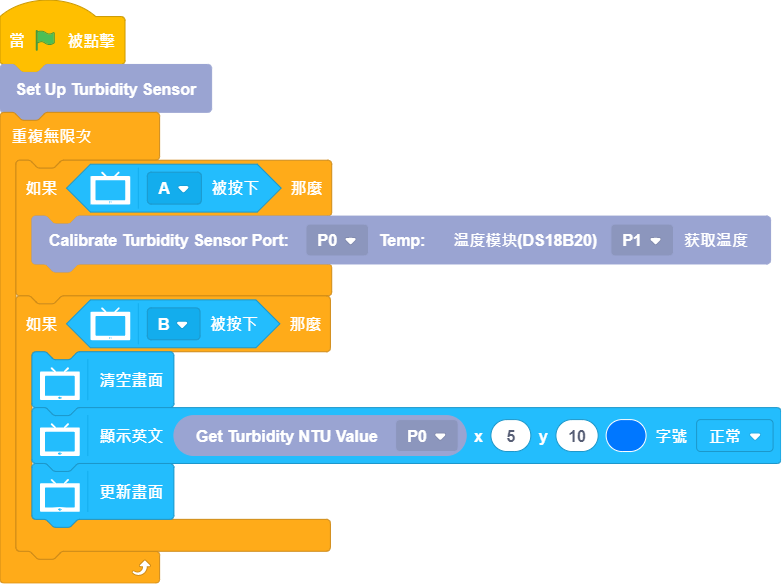
#### 污水混濁度感應器編程

```
污水混濁度感應器可以配合水溫感應器作校正使讀數更加準確。
注意：濁度感應器的頂部沒有防水，請不要將感應器完全浸入水中。
```

<figure><img src="https://kittenbothk.readthedocs.io/en/latest/_images/turbidity_kb3.png" alt=""><figcaption></figcaption></figure>

### 示範短片

#### Micro:bit

{% embed url="<https://youtu.be/4ePV6fmwoAA?t=77>" %}

#### 未來板

{% embed url="<https://youtu.be/4ePV6fmwoAA?t=7>" %}


---

# Agent Instructions: Querying This Documentation

If you need additional information that is not directly available in this page, you can query the documentation dynamically by asking a question.

Perform an HTTP GET request on the current page URL with the `ask` query parameter:

```
GET https://sharinghub.kittenbot.hk/functional_modules/turbidity.md?ask=<question>
```

The question should be specific, self-contained, and written in natural language.
The response will contain a direct answer to the question and relevant excerpts and sources from the documentation.

Use this mechanism when the answer is not explicitly present in the current page, you need clarification or additional context, or you want to retrieve related documentation sections.