> For the complete documentation index, see [llms.txt](https://sharinghub.kittenbot.hk/llms.txt). Markdown versions of documentation pages are available by appending `.md` to page URLs; this page is available as [Markdown](https://sharinghub.kittenbot.hk/functional_modules/waterpump.md).
# All in 1水箱連水泵組合
All in 1水箱連水泵組合 (HKBM8015A)
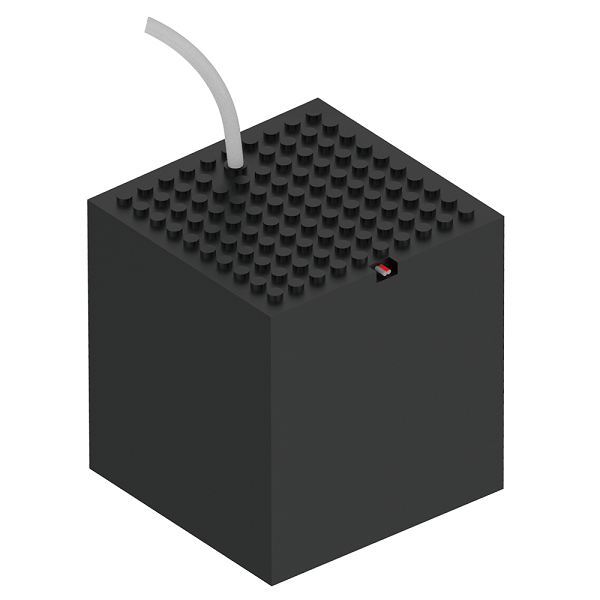
內置浸入式水泵一體化水箱,簡潔方便;水箱頂蓋和底部兼容樂高顆粒件,適合用作智能灌溉、自動洗手機等應用。
### 產品參數
* 工作電壓:3.3V\~6V
* 尺寸:86.5X86.5X98mm
* 額定電流:120mA(3.3V)
* 流量:80L/h
* 最大揚程:0.35M
* 重量:140g
* 膠管長度:60cm
* 接口:紅黑線
### 接線方法
### Armourbit
將電機的紅黑線連接至Armourbit底部的電機接口。
 ```
沒有嚴格正負極之分,插的方向只會影響電機轉動方向。
```
### Robitbit EDU/2.2
```
沒有嚴格正負極之分,插的方向只會影響電機轉動方向。
```
### Robitbit EDU/2.2
 ### MakeCode編程教學
#### 此模組可供Microbit和Meowbit使用。
#### ArmourBit
#### 加載Powerbrick插件:
#### 在擴展頁直接搜尋Powerbrick (powerbrick已經過微軟認證,可以直接搜尋)
#### 你亦可以用插件地址搜尋
powerbrick插件:
### MakeCode編程教學
#### 此模組可供Microbit和Meowbit使用。
#### ArmourBit
#### 加載Powerbrick插件:
#### 在擴展頁直接搜尋Powerbrick (powerbrick已經過微軟認證,可以直接搜尋)
#### 你亦可以用插件地址搜尋
powerbrick插件:
 #### [詳細方法](/programmingplatforms/makecode/kittenbotandmakecode.md)
#### 電機積木塊:
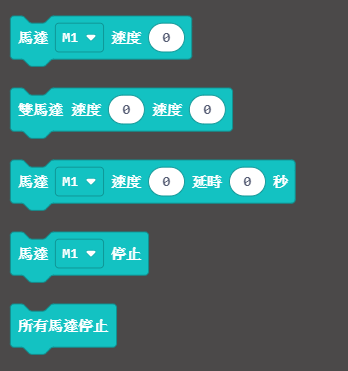
### 電機編程
{% embed url="" %}
[參考程式下載](https://bit.ly/PowerbrickM11_01Hex)
[參考程式網址](https://makecode.microbit.org/_RYHivyayYL4q)
#### Robotbit
#### 加載Robotbit插件:
#### 在擴展頁直接搜尋robotbit (robotbit已經過微軟認證,可以直接搜尋)
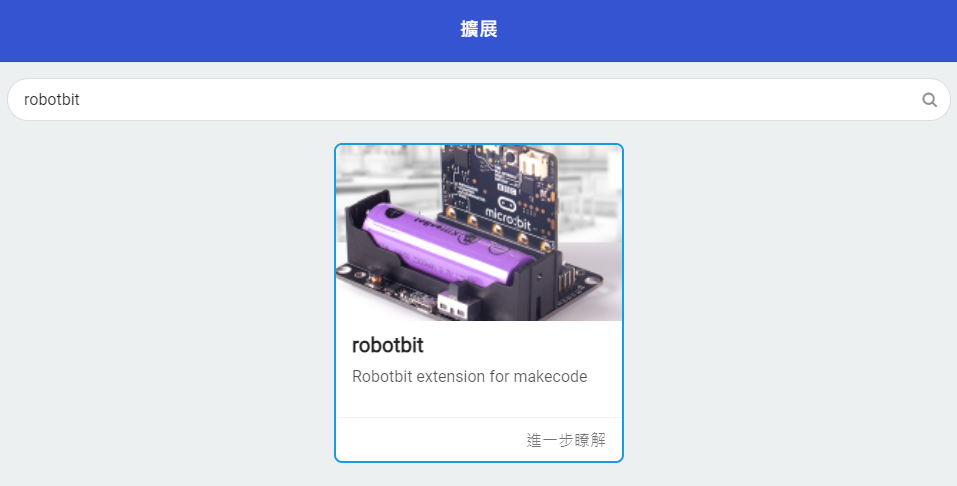
#### 你亦可以用插件地址搜尋
robotbit插件:
#### [詳細方法](/programmingplatforms/makecode/kittenbotandmakecode.md)
#### 電機積木塊:
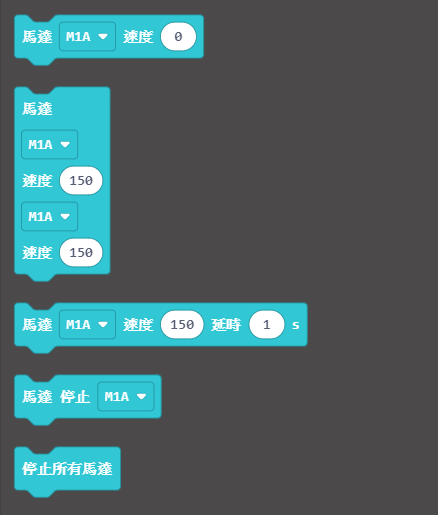
#### 電機編程
{% embed url="" %}
[參考程式網址](https://makecode.microbit.org/_hhF8kxdi3apA)
### Meowbit:
#### 加載robotbit插件:
#### [詳細方法](/programmingplatforms/makecode/kittenbotandmakecode.md)
#### 電機積木塊:

### 電機編程
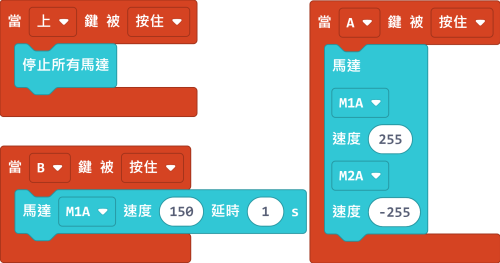
[參考程式網址](https://makecode.com/_2z0C8v6XAC5y)
### 示範短片
[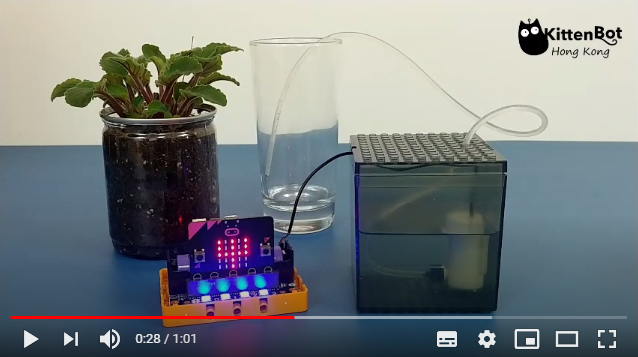](https://www.youtube.com/watch?v=xzTVRHEHfVs)
### 插件版本與更新
插件可能會不定時推出更新,改進功能。亦有時候我們可能需要轉用舊版插件才可使用某些功能。
詳情請參考: [Makecode插件版本更換](/programmingplatforms/makecode/makecodeextupdate.md)
### KittenBlock編程教學

#### 這教學使用Microbit作例子,每款擴展板/主控板的使用教學請參考相應頁面。
#### Armourbit
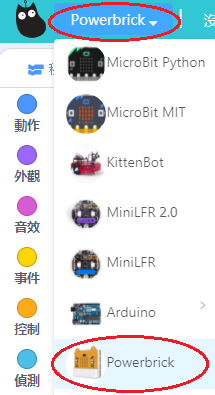
#### 加載PowerBrick插件
在左上角小貓logo旁邊的硬件欄選擇PowerBrick,加載Microbit與Powerbrick插件。
#### 電機積木塊
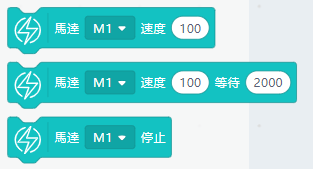
#### 電機編程
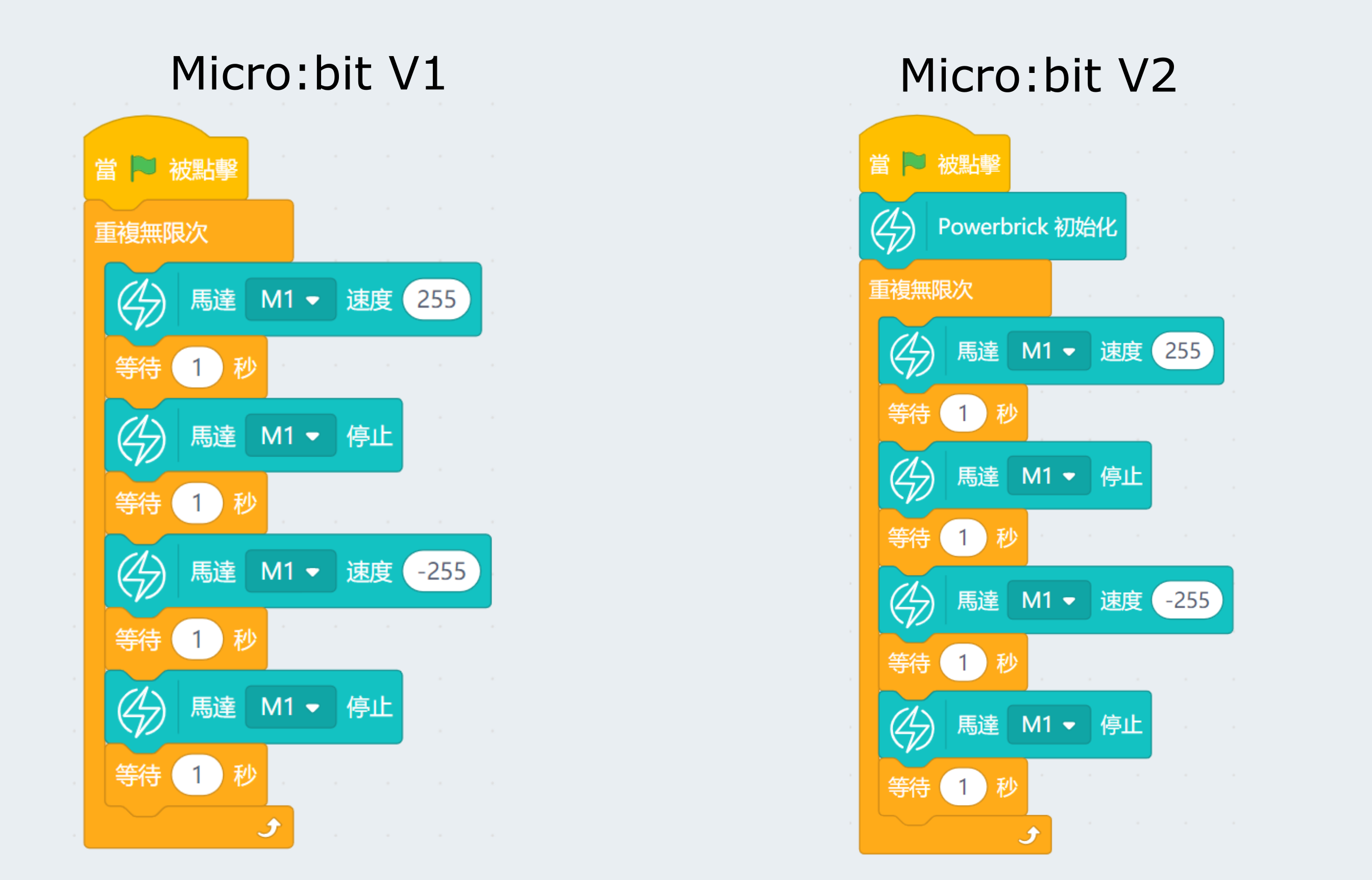
[參考程式下載](https://bit.ly/PowerbrickM11_01sb3)
#### Robotbit
#### 加載Robotbit插件
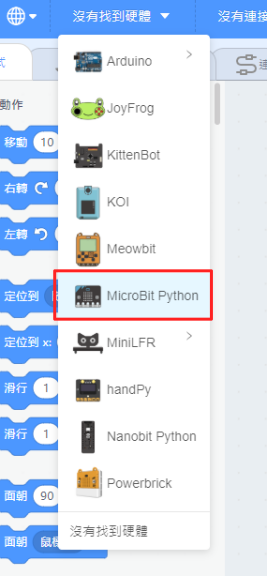
在左上角小貓logo旁邊的硬件欄選擇Microbit,加載Microbit與Robotbit插件。
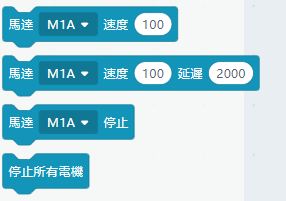
#### 電機積木塊
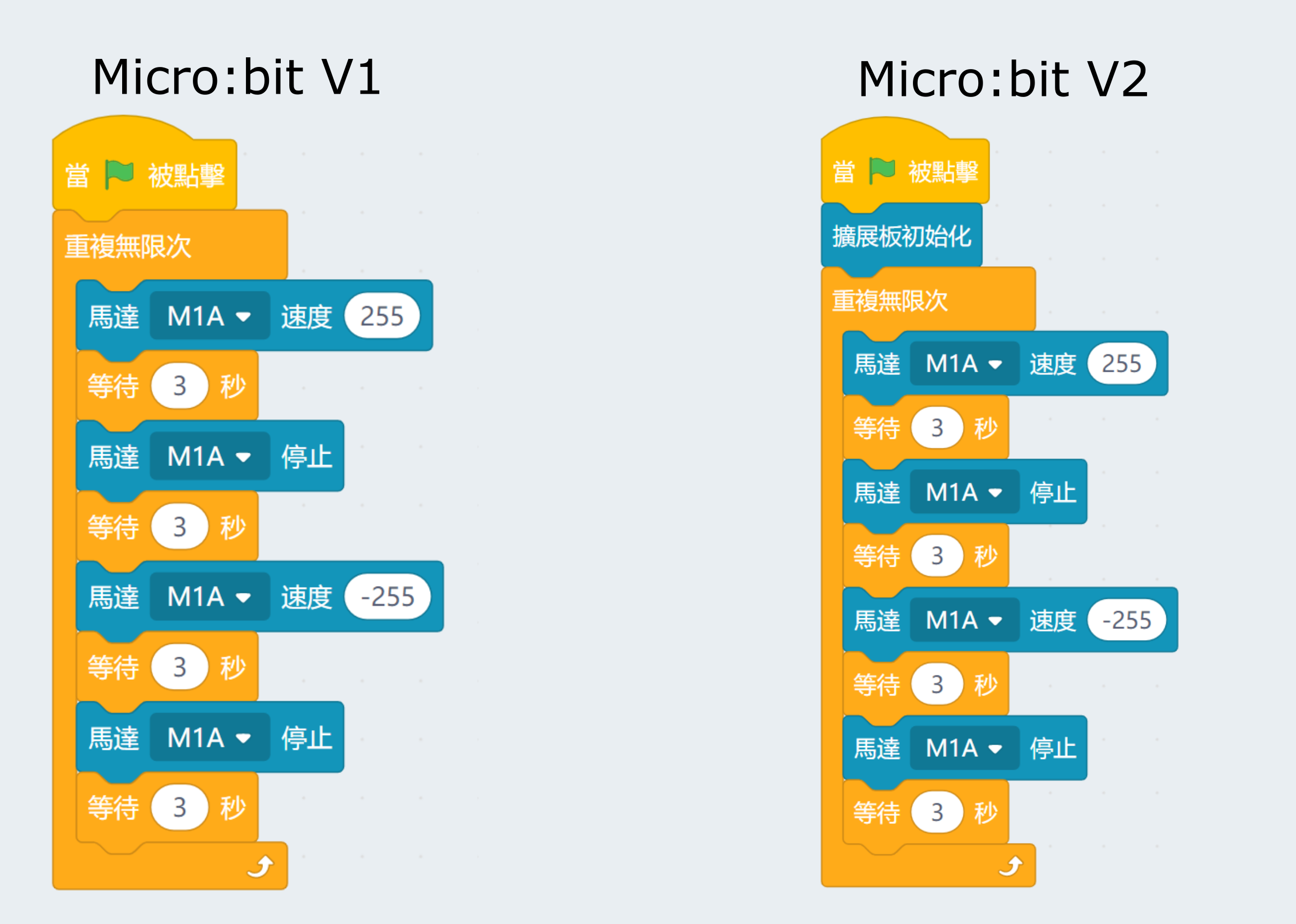
#### 電機編程
### FAQ
1:為什麼我點擊積木塊沒有反應呢?
首先確保已經連接好Microbit,然後上載韌體再試一試。
#### [詳細方法](/programmingplatforms/makecode/kittenbotandmakecode.md)
#### 電機積木塊:

### 電機編程
{% embed url="" %}
[參考程式下載](https://bit.ly/PowerbrickM11_01Hex)
[參考程式網址](https://makecode.microbit.org/_RYHivyayYL4q)
#### Robotbit
#### 加載Robotbit插件:
#### 在擴展頁直接搜尋robotbit (robotbit已經過微軟認證,可以直接搜尋)

#### 你亦可以用插件地址搜尋
robotbit插件:
#### [詳細方法](/programmingplatforms/makecode/kittenbotandmakecode.md)
#### 電機積木塊:

#### 電機編程
{% embed url="" %}
[參考程式網址](https://makecode.microbit.org/_hhF8kxdi3apA)
### Meowbit:
#### 加載robotbit插件:
#### [詳細方法](/programmingplatforms/makecode/kittenbotandmakecode.md)
#### 電機積木塊:

### 電機編程

[參考程式網址](https://makecode.com/_2z0C8v6XAC5y)
### 示範短片
[](https://www.youtube.com/watch?v=xzTVRHEHfVs)
### 插件版本與更新
插件可能會不定時推出更新,改進功能。亦有時候我們可能需要轉用舊版插件才可使用某些功能。
詳情請參考: [Makecode插件版本更換](/programmingplatforms/makecode/makecodeextupdate.md)
### KittenBlock編程教學

#### 這教學使用Microbit作例子,每款擴展板/主控板的使用教學請參考相應頁面。
#### Armourbit
#### 加載PowerBrick插件
在左上角小貓logo旁邊的硬件欄選擇PowerBrick,加載Microbit與Powerbrick插件。

#### 電機積木塊

#### 電機編程

[參考程式下載](https://bit.ly/PowerbrickM11_01sb3)
#### Robotbit
#### 加載Robotbit插件
在左上角小貓logo旁邊的硬件欄選擇Microbit,加載Microbit與Robotbit插件。

#### 電機積木塊

#### 電機編程

### FAQ
1:為什麼我點擊積木塊沒有反應呢?
首先確保已經連接好Microbit,然後上載韌體再試一試。