# 聲控衣架

透過KittenBlock的語音辨識功能,可以做到辨識到某個文字就控制衣架的應用。
### 組裝說明書下載
[組裝說明書下載](https://drive.google.com/drive/folders/1wg_edUZFrqyUONA0FJ6vFBkGArRsfnf4?usp=sharing)
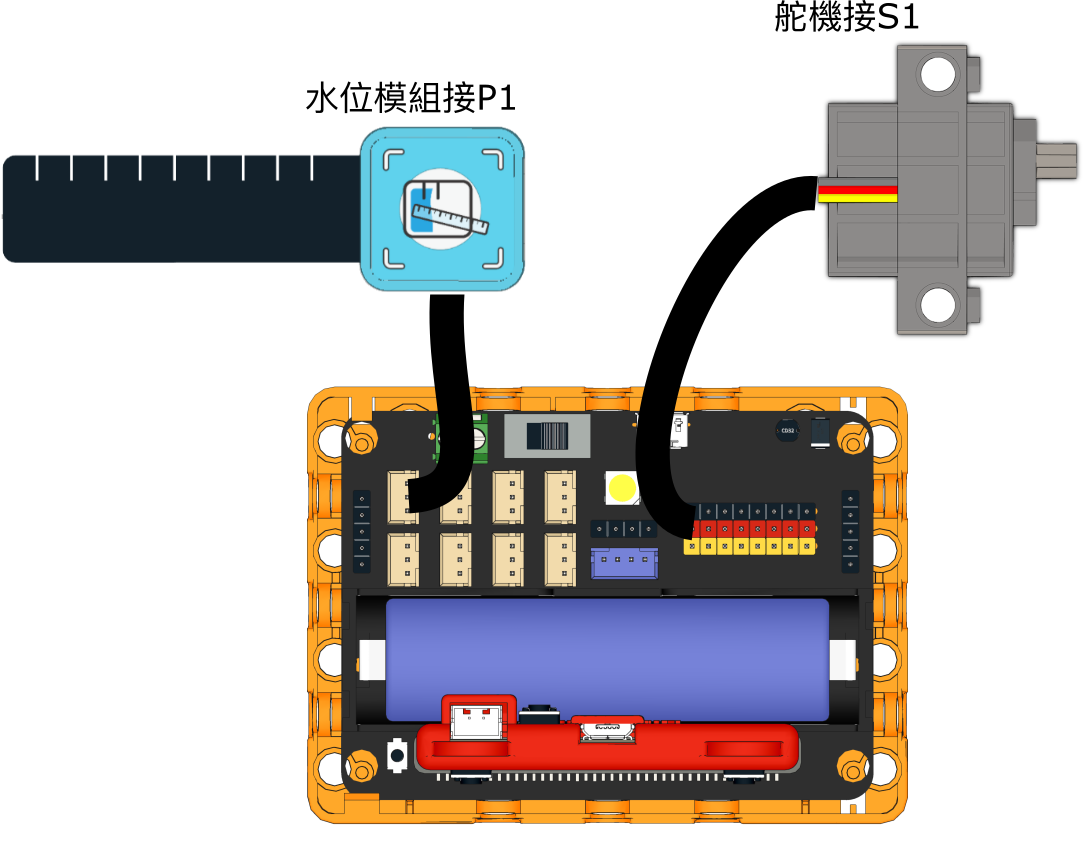
### 參考程式
{% file src="/files/iFvBNuGaouUGylShP2w5" %}
{% hint style="info" %}
這應用需要使用Token。
{% endhint %}
### 應用玩法
{% hint style="info" %}
這應用需要使用Token。
{% endhint %}
1. 連接好Micro:bit和打開Robotbit電源
2. 按下空白鍵啟動語音辨識
3. 當語音辨識結果為Rain的時候,衣架會自動收起
4. 當語音辨識結果為Sunny的時候,衣架會自動伸出
---
# Agent Instructions: Querying This Documentation
If you need additional information that is not directly available in this page, you can query the documentation dynamically by asking a question.
Perform an HTTP GET request on the current page URL with the `ask` query parameter:
```
GET https://sharinghub.kittenbot.hk/kits/inventorkit/kittenblockai/hanger.md?ask=
```
The question should be specific, self-contained, and written in natural language.
The response will contain a direct answer to the question and relevant excerpts and sources from the documentation.
Use this mechanism when the answer is not explicitly present in the current page, you need clarification or additional context, or you want to retrieve related documentation sections.