# 手勢控制小車

透過PoseNet肢體檢測模型,辨識到左手和右手的位置從而控制小車方向。
### 組裝說明書下載
[組裝說明書下載](https://drive.google.com/drive/folders/1wg_edUZFrqyUONA0FJ6vFBkGArRsfnf4?usp=sharing)
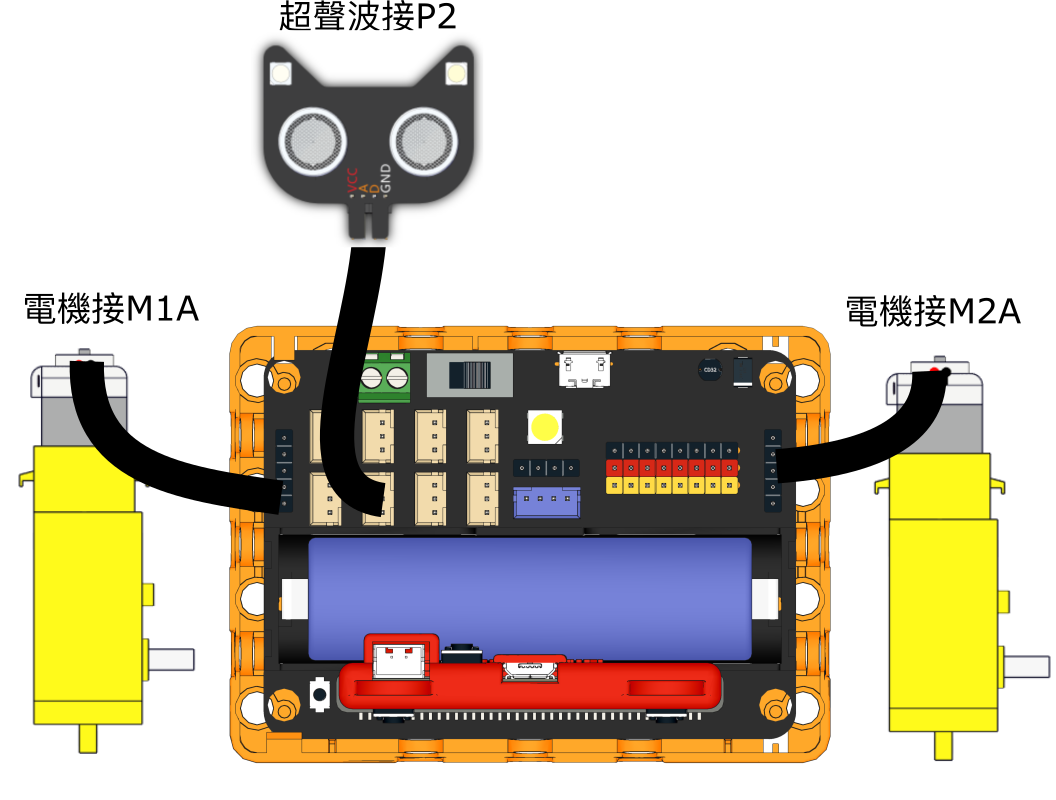
### 參考程式 小車接收
{% hint style="info" %}
將此程式下載到機械車的Micro:bit上
{% endhint %}
{% file src="/files/VqzgfmiSUrCcbGdn1Lfm" %}
{% hint style="info" %}
打開代碼模式然後按上陣,等待完成上傳程式到Micro:bit
{% endhint %}
### 參考程式 小車遙控
{% file src="/files/b5pP5USn5oBoDDnR4NBE" %}
### 應用玩法
1. 連接好Micro:bit和打開Robotbit電源
2. 點擊綠色旗啟動程式
3. 鏡頭會追蹤人體,將左右手的拳頭放在鏡頭裡面做出握著方向盤的姿勢
4. 當雙手高度大致水平,小車就會向前行駛
5. 當其中一隻拳頭明顯較高,小車就會轉向
---
# Agent Instructions: Querying This Documentation
If you need additional information that is not directly available in this page, you can query the documentation dynamically by asking a question.
Perform an HTTP GET request on the current page URL with the `ask` query parameter:
```
GET https://sharinghub.kittenbot.hk/kits/inventorkit/kittenblockai/kart.md?ask=
```
The question should be specific, self-contained, and written in natural language.
The response will contain a direct answer to the question and relevant excerpts and sources from the documentation.
Use this mechanism when the answer is not explicitly present in the current page, you need clarification or additional context, or you want to retrieve related documentation sections.