# 智慧道路管理系統

### 組裝說明書下載
[組裝說明書下載](https://drive.google.com/drive/folders/1wg_edUZFrqyUONA0FJ6vFBkGArRsfnf4?usp=sharing)
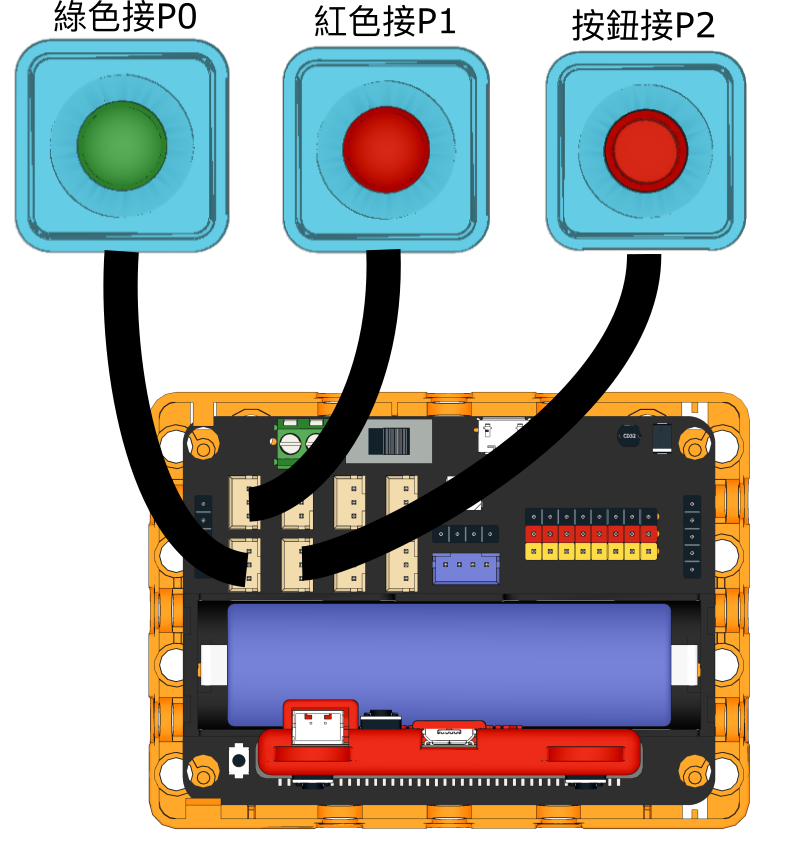
打開影像分類,使用teachable machine訓練模型
{% hint style="info" %}
記住模型訓練後要將訓練項目導出儲存以供之後使用
{% endhint %}
### 參考程式 - 模型運行
{% file src="/files/m6RuUILcthOxUXMr8RdM" %}
### 應用玩法
1. 連接好Micro:bit和打開Robotbit電源
2. 點擊綠色旗啟動程式
3. 將八達通卡圖樣放在鏡頭面前,按下Sugar按鍵
4. 系統就會辨認圖像,如果辨認結果為old,程式就會給予10秒過路時間
5. 否則程式就會給予5秒過路時間
---
# Agent Instructions: Querying This Documentation
If you need additional information that is not directly available in this page, you can query the documentation dynamically by asking a question.
Perform an HTTP GET request on the current page URL with the `ask` query parameter:
```
GET https://sharinghub.kittenbot.hk/kits/inventorkit/kittenblockai/trafficlight.md?ask=
```
The question should be specific, self-contained, and written in natural language.
The response will contain a direct answer to the question and relevant excerpts and sources from the documentation.
Use this mechanism when the answer is not explicitly present in the current page, you need clarification or additional context, or you want to retrieve related documentation sections.