> For the complete documentation index, see [llms.txt](https://sharinghub.kittenbot.hk/llms.txt). Markdown versions of documentation pages are available by appending `.md` to page URLs; this page is available as [Markdown](https://sharinghub.kittenbot.hk/sciencekit/futureboard_lite_operations.md).

# 未來板Lite操作教學

未來板Lite已經儲存好科學教育測量套件的程式，同學們只需要上課時選擇相應程式就可以用到，完全不需要編程。

### 進入程式選擇畫面

打開電源。

<figure><img src="https://files.gitbook.com/v0/b/gitbook-x-prod.appspot.com/o/spaces%2FsN6MlwBFbL3P67FzMMyL%2Fuploads%2FkzfTd5kl1jQuLnfSTjoA%2Fimage.png?alt=media&#x26;token=f841702f-f439-4a0a-939a-212c8b5bc3a0" alt=""><figcaption></figcaption></figure>

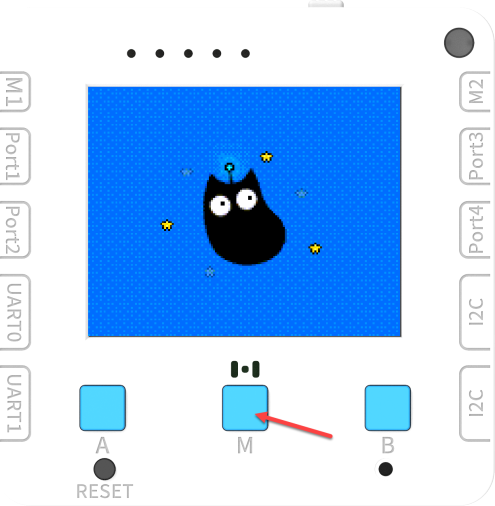
開機時按實M鍵不放，未來板Lite就會進入主界面。

<figure><img src="https://files.gitbook.com/v0/b/gitbook-x-prod.appspot.com/o/spaces%2FsN6MlwBFbL3P67FzMMyL%2Fuploads%2Fv9sTxGVsibZnVyvL9WLW%2Fimage.png?alt=media&#x26;token=b8ff9644-3cbc-4d3f-8535-45c1ce6dd0c2" alt=""><figcaption></figcaption></figure>

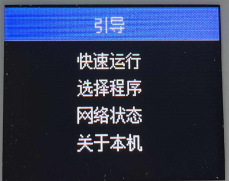
按A和B可以選擇選項，前往選擇程序然後按M鍵確認。

<figure><img src="https://files.gitbook.com/v0/b/gitbook-x-prod.appspot.com/o/spaces%2FsN6MlwBFbL3P67FzMMyL%2Fuploads%2FqYd1YACoXLndcWzP9uwP%2Fimage.png?alt=media&#x26;token=f0df32ae-fa5e-449d-831c-9f1619962fc3" alt=""><figcaption></figcaption></figure>

未來板Lite就會列出板上主目錄的py檔，選擇好之後按M鍵就會啟動程式。


---

# Agent Instructions
This documentation is published with GitBook. GitBook is the documentation platform designed so that both humans and AI agents can read, navigate, and reason over technical content effectively. Learn more at gitbook.com.

## Querying This Documentation
If you need additional information that is not directly available in this page, you can query the documentation dynamically by asking a question.

Perform an HTTP GET request on the current page URL with the `ask` query parameter, and the optional `goal` query parameter:

```
GET https://sharinghub.kittenbot.hk/sciencekit/futureboard_lite_operations.md?ask=<question>&goal=<endgoal>
```

`ask` is the immediate question: it should be specific, self-contained, and written in natural language.
`goal` is optional and describes the broader end goal you are ultimately trying to accomplish on behalf of the user. GitBook uses it to tailor the answer towards what is most useful for that goal.

The response will contain a direct answer to the question and relevant excerpts and sources from the documentation.

Use this mechanism when the answer is not explicitly present in the current page, you need clarification or additional context, or you want to retrieve related documentation sections.